¶ Introduction
A configuration can be understood as an instruction for the application on how to behave, and what to show.
Every configuration is split into pages. At any point in time, exactly one page is shown to the user.
Configurations can be edited via the editor. They can then be assigned to a scanner, also using the editor.
The application will then, upon launching, ask the server for the config that was assigned to the paired scanner, load it, and display it.
¶ Config settings
A config has several general settings that define the application's behaviour in certain cases.
For instance, the app checks whether the device's internet is enabled, whether an update is available, or whether a language was selected.
Note
These checks are executed every time the user navigates to the initial page of the config. In mose cases, this is the home screen.
The initial page can be selected in these config settings.
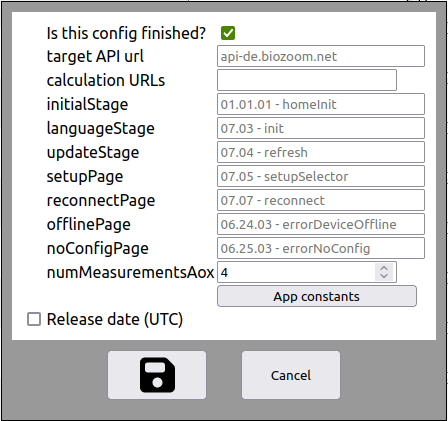
As depicted in the image above, there are a multitude of options. These include
- Is this config finished?
- If this is set, the config is marked as 'finished', and that users should be able to use it.
- target API url
- This field offers a dropdown menu, and denotes which server the users should download their config and media from. It is suggested to use one that will be close to the majority of the expected userbase.
- calculation URLs
- CAUTION: This is an optional field that can overwrite which server should evaluate the measurement. Unless specifically needed, do not enter anything.
- initialStage
- The stage selected here will be the initial page of the config. It is the first screen the users sees upon loading a new config or launching the application.
- homeStage
- The stage selected here will be the home page of the config. It will always check whether the device and the application are set up properly.
- languageStage
- If the user is on the initial screen and the application does not have a language selected yet, they will be forwarded to this page. The user should be able to select their language here.
- updateStage
- If the user is on the initial screen and a new scanner is paired, or a scanner is paired for the very first time, they will be forwarded to this page. The page selected here should do just that - download a new config.
- setupPage
- If the user is on the initial screen and no scanner is paired or connected, they will be forwarded to this page. This page should allow the user to perform a pairing process.
- reconnectPage
- If the user is on the initial screen and the previously paired scanner can not be reached (USB only), the user will be forwarded to this page.
- offlinePage
- If the user is on the initial screen and the device is not connected to the internet via mobile data or wifi, they will be forwarded to this page.
- noConfigPage
- If the user is on the initial screen and there is no config for the current scanner, they will be forwarded to this page.
- numMeasurementsAox
- If the user performs a precision measurement, this denotes how many single measurements are needed for the precision measurement. The default is 4, but can be selected freely.
-
Should the device check for a USB connection?
- If this box isn't checked, no USB connection will be established. This can be useful for setups where only WiFi is supported, as well as no-scanner environments like the production manager.
-
App constants
- Several app-specific values can be set here, such as thresholds for the hand-recognition process.
-
Release date
- A date and an alternative config can be selected here. If the given date is not yet reached, users that are assigned this config will instead be given the alternative config.