¶ Introduction
A page contains information about what is displayed to the user, as well as what every element does.
For instance, multiple buttons could be placed on the page, each leading to a different other page.
¶ Purpose of a page
A page displays some form of content to the user, and might execute a function in the background.
¶ Navigation between pages
Navigating from one page to another can be done in one of the following ways
- A button that can be clicked by the user
- A function will, upon finishing, go to one of multiple other pages
- A timeout can be assigned to a page that will jump to another page after a certain amount of time
¶ Page contents
¶ Function
The first decision for each page is whether it should execute a function, and if so, which function. This is the logic behind the page.
Functions can be almost anything, for example
- Connect the device (phone) to the scanner
- Perform an "is a hand placed on the scanner"-check
- Measure the AOX value of the user
Note that every page can only have up to one function attached to it, never more.
Depending on the function that was chosen, the page might only be visible for a very short time (because the function executes almost instantly, and proceeds to the next one), and designing this particular page can be skipped. However, it is good practice to design all pages nonetheless.
¶ Background
A page should have a background of any type, as well as some screen dimensions, as all other elements are positioned using those reference dimensions.
¶ Elements
All elements on a page, such as buttons or graphics, can be placed using this guide.
¶ Timeout
A timeout function can be assigned to each page. This means that after a given time (for instance, after 60 seconds) of being on this page, the application will automatically jump to another page in the config. This can be done to perform regular updates while on the home page, or to jump to an error page after not recognizing a hand on the scanner for a certain amount of time.
¶ Limit screen resolution
The current user's device's resolution ratio can be checked, and if it does not match certain criteria, an alternative page will be displayed.
¶ Set screen orientation
It can be decided whether or not the device's rotate-display-feature is enabled.
In case it is locked, a mode which will be used must be chosen.
¶ Enable scrolling
In case the background (or an element) exceeds what the screen can display, vertial- and/or horizontal scrolling might be enabled.
¶ Page structure
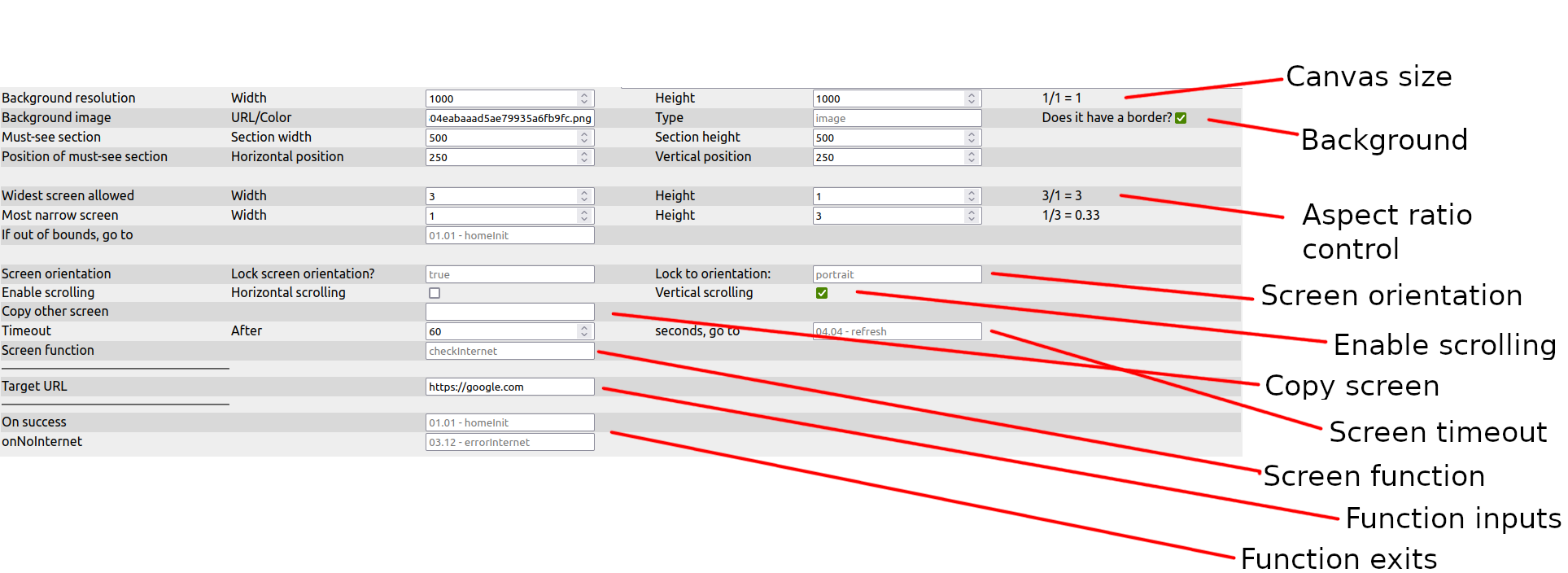
¶ Canvas size
Unless a background border is set, this is the size of the canvas. In case of a background image without a border mode, this size should be equal to the image resolution.
¶ Background
The graphic that is displayed in the background and, if the border mode is active, the must-see-area's size and position
¶ Aspect ratio control
The maximum- and minumum aspect ratio that a device's display may have in order to display this page, as well as an alternative page in case these limits are exceeded.
¶ Screen orientation
Lock or unlock the screen rotation feature, as well as select which orientation mode should be used in case of a locked screen rotation.
¶ Enable scrolling
If the background image (or some elements) exceeds the display's dimensions, scrolling in one or both dimensions may be enabled.
¶ Copy screen
Another page can be selected here. All values of that page will be copied into this one (This field will be cleared again right afterwards).
¶ Screen timeout
Control a maximum time the user may stay on this page before another screen will be jumped to.
¶ Screen function
A function that will execute upon entering this screen.
¶ Function inputs
Additional inputs that might be required by the screen function.
¶ Function exits
For different outcomes of the function, select where the app will go to next.